|
|
|
|
| |
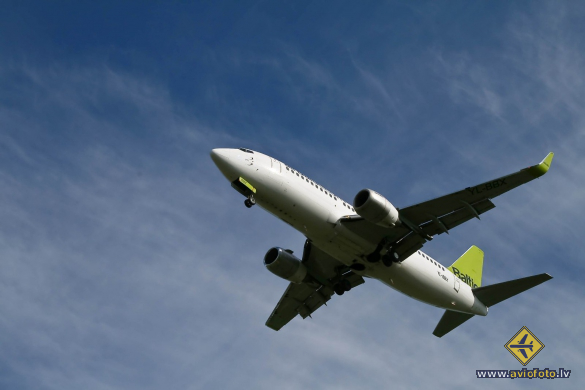
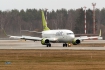
| Boeing 737-36Q |
| 5. bilde no 8 bildēm |
|
|
Lielāka izmēra attēls ir pieejams tikai reģistrētiem lietotājiem.
|
|
|
| |
|
| |
|
| mm: |
49/1 mm |
| slēdzis: |
1/500 s |
| diafragma: |
f/18/1 |
| iso: |
400 |
|
|
| |
| Citi šī autora attēli: |
|
|
| |
| Citi šīs lidostas attēli: |
|
|
| |
| Citi šīs lidmašīnas attēli: |
|
|
| |
|
|
|
|
|
[Ieteikt dzēšanai] |
| |
| Komentārs: |
|
|
| |
|
|
eliasson
2010-11-16 17:20:48
|
|
|
| Varbūt nedaudz ir stūrī iespiests, bet kopumā patīk |
|
|
|
|
| |
|
|
Manfreds
2010-11-17 23:45:26
|
|
|
| ...bet putekļus prasās novākt |
|
|
|
|
| |
|
|
Agent747
2010-11-18 10:03:18
|
|
|
| Hmm, kā to vislabāk izdarīt? |
|
|
|
|
| |
|
|
eliasson
2010-11-18 10:08:57
|
|
|
par putekļiem ir airlineros pamācība, bet ja īsumā, tad
1.jāuztaisa vēl viens slānis uz tā (Image>Adjustments>equalize) tur labi parādās visi putekļi. Tad ar klonēšanu tos aizīmē uz jauni radītā slāņa. Lieko slāni izdzēš un gatavs |
|
|
|
|
| |
|
|
Agent747
2010-11-18 10:09:46
|
|
|
| Paldies par info :) |
|
|
|
|
| |
|
|
eliasson
2010-11-18 10:12:16
|
|
|
1. Create a duplicate layer: Layer-> Duplicate layer.
2. Press F7 to bring up the layers window, this will appear to the right of your screen.
3. Select the new "Background Copy" by clicking on the name.
4. Now equalize the image, (3.0) Filter-> Adjustments->Equalize,(2.0) Image->Adjustments->Equalize.
5. Select the "Background layer" instead of the "Background Copy" layer. You will still see the equalized image, but all changes are being made on the original image.
6. Select heal tool, you will need to set the heal tool so press 'Alt' and click, (left click) near the spot in question, do this for each spot. Photoshop CS2 has a "spot healing brush tool" which allows removing dust spots by a single mouse click.
7. Heal the dust spots on the image. You will not see the spots disappear, but they do disappear on the original image so remember which ones you did already. If you healed all dust spots continue to the next step.
8. You can now delete the "Background Copy" layer. Select the "Background Copy" by clicking on it and then delete, Layer->Delete Layer.
9. You should now see the original image, which if the above steps are performed correctly is free of dust spots.
|
|
|
|
|
| |
|
Attēlus komentēt var tikai reģistrēti lietotāji.
|
| |
|
|
|
|
|
|